Built for major week

Golf pools peopleactually want to check.

Create the pool in minutes. Send one link. Players pick themselves. Then spend Thursday through Sunday watching the board do its thing.

Pool group feedback

"This was the most fun our group has had in a pool. Everyone kept checking the live board, and the group text was blowing up. You knew who to root for, who to root against, and why your card was moving."

PGA Championship

Tiger's Tribe pool

Demo
1
Lonnie
-26
-8
Scheffler
F
-7
McIlroy
17
-6
Schauffele
F
-5
Morikawa
16
2
Jeff
-25
-7
McIlroy
17
-8
Scheffler
F
-5
Cantlay
F
-5
Homa
15
3
Dan M
-21
-6
Schauffele
F
-5
Morikawa
16
-8
Scheffler
F
-2
Åberg
15
4
Mikey
-18
-6
Thomas
F
-5
Fleetwood
17
-4
Finau
F
-3
Lowry
16
5
Rick
-17
-6
Hovland
F
-5
Cantlay
17
-3
Day
F
-2
Burns
16
6
Bryan
-15
-5
Rahm
F
-4
Koepka
17
-5
Homa
F
-1
Clark
16
12 picks
Best shown
Live scoring

Built for

The person everyone expects to run the pool.

Office pools

One link for the group, one board for standings, no Sunday spreadsheet cleanup.

Bar leagues

Print the QR poster, tape it up, and let players join from their phones.

Weekend groups

Fast setup for every major without rebuilding the same pool from scratch.

01

Create the pool

Pick the tournament, choose the format, and share the join link.

02

Players pick themselves

No spreadsheet chasing. Entries lock automatically before the first tee time Thursday.

03

Watch the board move

Follow live scoring, cut drama, and the Sunday chase from one leaderboard.

Game formats

Play the normal pool or mix it up.

Not every group wants the same pool. Keep it familiar, balance the favorites, or make the room sweat a random draw.

Open Picks

Pick anyone in the field. No tiers, no tricks. Pure conviction.

Tiered Picks

WGR tiers stop every entry from loading up on the same favorites.

Clubhouse Chaos

Random groups. Same chaos for everyone. Suddenly one dark horse can move the whole pool.

Pool runner tools

Invites, posters, and run-it-back built in.

Invite link and passcode

Send one link or code. Players enter their own picks.

Previous-player invites

Bring last week's group back without rebuilding the list.

Runner reminders

See who still needs picks and copy one clean reminder for the group chat.

Run it back

Copy the pool setup for the next tournament and move faster.

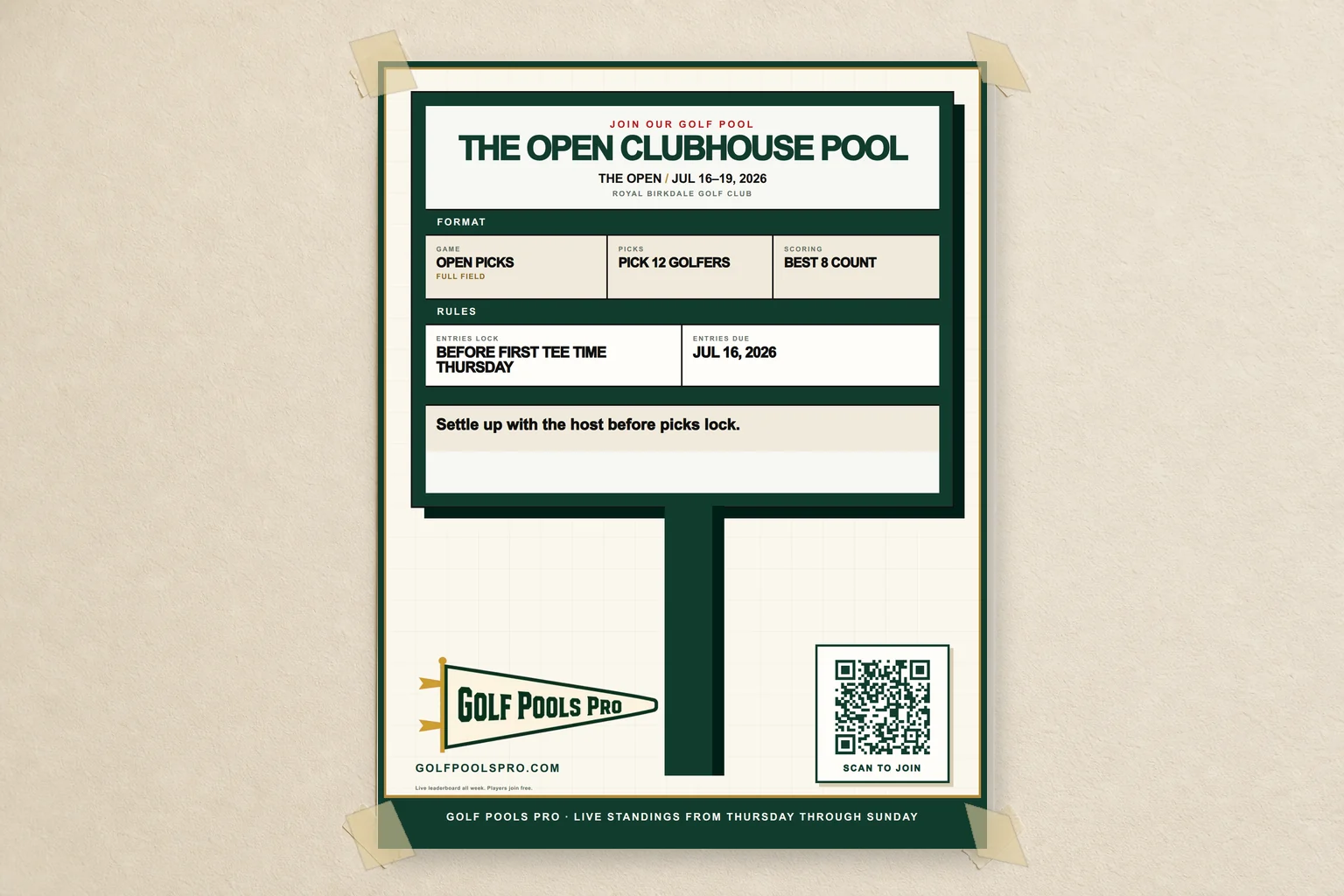
QR signup posters

Print it, tape it up, and let the QR code do the chasing.

Built for bars, clubs, offices, and weekend groups. Make a tournament poster with the join code, QR code, format, rules, and your own note.

Scan to join

Add the poster to the bar, clubhouse counter, office wall, or group email.

What runs the pool

A golf pool app that does not feel like office software.

The spreadsheet can track names. Golf Pools Pro gives your group the live board, rooting angles, and tournament-week energy people come back for.

Live standings

Give everyone a board worth checking from Thursday morning through Sunday afternoon.

Who to root for

See which golfers are carrying each entry and which picks can flip the board.

Cut and OB drama

Missed cuts and OB stand-ins are handled by the pool rules instead of spreadsheet math.

Tournament board feel

A golf pool should feel like major week, not a stale office admin screen.

Smart alerts

Players can get notified when scoring starts, picks are due, or they jump into first.

Fast invites

Invite by link, passcode, or previous-player list when you run the next pool.

Run it back

Reuse the same group for the next tournament instead of starting from scratch.

Players join free

Players never hit a payment screen. The host settles the software fee after picks lock.

Final board recap

Share the final standings when the last putt drops.

After the final putt

Share the final board.

When the tournament ends, the standings are ready to send back to the group. No rebuilding a recap from screenshots and scorecards.

Golf Pools Pro final board share preview

Simple pricing

Free for small pools. Capped for bigger ones.

Players never see a payment screen. The host pays once after picks lock, and small pools can run free.

First 5 entriesFree
6 to 100 entries$1 each, $20 max
Over 100 entries+$10 / 100
Example: a 13-entry pool costs $8. A 100-entry pool is capped at $20. A 160-entry pool costs $30.

Common questions

Questions every pool runner gets.

Golf Pools Pro handles rules, missed cuts, fees, and entry limits up front, so Sunday is about the leaderboard, not the group chat.

What happens if one of my golfers misses the cut?+

They move out of your counted scores if you have better active picks. If too many picks miss the cut, Golf Pools Pro fills the open counted spots with OB stand-ins based on the pool rules.

How does the OB rule work?+

OB keeps every entry at the same number of counted scores. If your pool counts 4 golfers and you only have 3 active golfers left, the empty spot gets an OB score based on the worst active counted score plus the pool penalty.

Is there a limit on entries?+

No. Add as many entries as you need. The first 5 are free, entries 6 through 100 are $1 each with a $20 cap, and pools over 100 add $10 for each started 100 entries after that.

Do players need to pay to join?+

Players join with the pool link or passcode, make picks, and follow the leaderboard. Entries lock automatically before the first tee time Thursday. The host handles the pool fee after entries lock.

Can I use this for an office pool or a group text pool?+

Yes. If your pool usually lives in a spreadsheet or group text, Golf Pools Pro gives everyone one place for picks, rules, and the live board.

Can players get notifications?+

Yes. Players can turn on alerts for live scoring, pick deadlines, and taking the lead.

Can I run the same pool again?+

Yes. Pool runners can reuse a previous group and invite those players back faster for the next tournament.

Can I install Golf Pools Pro on my phone?+

Yes. Golf Pools Pro is a Progressive Web App, so you can add it to your iPhone or Android home screen from the browser.

iPhone

  1. Open Golf Pools Pro in Safari.
  2. Tap the Share button.
  3. Choose Add to Home Screen.
  4. Tap Add.
Apple iPhone PWA help

Android

  1. Open Golf Pools Pro in Chrome.
  2. Tap the three-dot menu.
  3. Choose Add to Home screen or Install app.
  4. Tap Install or Add.
Chrome Android PWA help

Golf pool manager

Set up your next pool before the first tee time.

You should not be running a spreadsheet on Sunday. Set up the pool, share the link, and let the leaderboard handle the rest.

Create pool